Agile Tools: Understanding Kanban Boards
An overview of Kanban boards, their pipelines, and workflow in Agile project management, with a focus on ZenHub integration with GitHub
This document explains Kanban boards as visual project management tools in Agile methodology. It covers how Kanban boards track work progression through various pipelines, their implementation in tools like ZenHub, and how they integrate with development platforms like GitHub to provide a single source of truth for project status while supporting Agile processes rather than replacing them.
Tools Support Agile Processes, Not Replace Them
Many Agile planning tools are available to support Agile methodologies, but it’s crucial to understand that tools alone do not make an organization Agile. Tools support existing Agile processes but cannot substitute for the proper Agile mindset and practices.
The Tool Misconception
Without proper training and understanding, team members often try to force traditional project management approaches into Agile tools. For example, attempting to make a Kanban board function like a Gantt chart fundamentally misunderstands the different approaches to project management that each tool represents.
Tool Complexity Considerations
Agile planning tools vary in complexity. Some offer extensive hierarchical structures with epics, stories, tasks, and subtasks, which can lead to micromanagement. For many teams, focusing on epics and stories provides sufficient planning detail while maintaining agility.
ZenHub: GitHub-Integrated Kanban
ZenHub is a project management tool that integrates directly with GitHub, allowing development teams to manage projects without leaving their primary development environment.
Key Benefits of GitHub Integration
The primary advantage of ZenHub is its seamless integration with GitHub:
- Developers remain in their preferred environment
- GitHub issues become the stories in the Kanban board
- Status updates happen automatically as part of the development workflow
- No context switching between multiple tools is required
Single Source of Truth
This integration creates a single source of truth for project status. When management asks about project progress, the Kanban board provides immediate visibility into:
- Issues not yet started (in the sprint backlog)
- Issues currently being worked on (and by whom)
- Issues that have been completed
The status remains accurate because developers update it as a natural part of their workflow rather than as a separate administrative task.
Kanban Board Fundamentals
A Kanban board is a visual project management tool that represents workflow stages as columns and work items as cards that move across these columns.
Core Concept
At its simplest, a Kanban board consists of three basic columns:
| Column | Purpose |
|---|---|
| To Do | Work items that need to be completed |
| Doing | Work items currently in progress |
| Done | Work items that have been completed |
This visual representation provides an immediate understanding of project status, showing what needs to be done, what is being worked on, and what has been completed.
Physical Origins
Kanban boards originated as physical tools—whiteboards with sticky notes that could be moved across columns to show progress. This physical implementation highlights the simplicity and visual nature of the approach, with each sticky note representing a story or work item that moves across the board as work progresses.
ZenHub Pipeline Structure
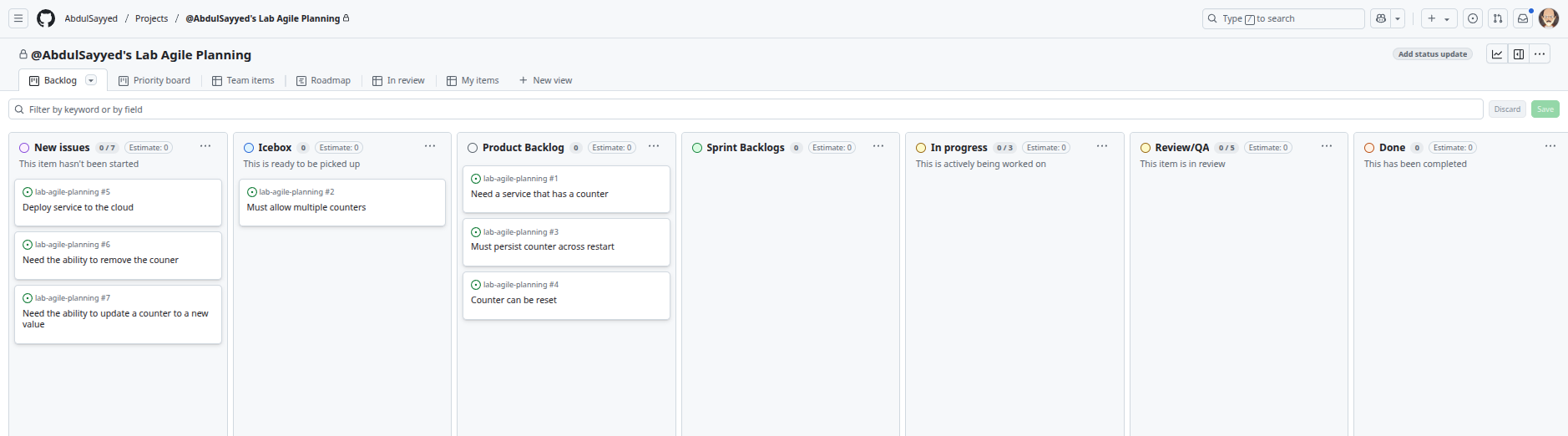
ZenHub implements the Kanban concept through pipelines (columns) that represent different stages in the workflow. The default configuration includes several standard pipelines that can be customized based on team needs.
Default ZenHub Pipelines
| Pipeline | Purpose |
|---|---|
| New Issues | Serves as an inbox for newly created issues, requiring triage |
| Icebox | “Cold storage” for long-term ideas not actively being worked on |
| Product Backlog | Contains all planned work items not yet scheduled for a specific sprint |
| Sprint Backlog | Contains work items planned for the current sprint (next two weeks) |
| In Progress | Shows work items currently being actively worked on |
| Review/QA | Contains completed work requiring review or testing before acceptance |
| Done | Contains work items that have been completed and merged |
Triage and Organization
Regular backlog refinement includes triaging new issues (similar to managing an email inbox) and moving items to appropriate pipelines. This process keeps the board organized and ensures that new items are properly categorized.
Long-term Planning with the Icebox
The icebox pipeline is a unique ZenHub feature that provides storage for ideas and tasks planned for the distant future. This separation helps keep the product backlog focused on more immediate priorities while ensuring long-term ideas aren’t forgotten.
Workflow Across a Kanban Board
The workflow in a Kanban board follows a left-to-right progression, with work items moving through various stages of completion.
Developer Focus on Sprint Backlog
Developers primarily focus on the sprint backlog, which contains the work items planned for the current sprint. This focused view helps the team concentrate on immediate priorities rather than being distracted by the entire product backlog.
Work Progression
When a developer begins working on an item, they:
- Move the issue from Sprint Backlog to In Progress
- Assign the item to themselves (showing ownership)
- Complete the development work
- Create a pull request when complete
- Move the item to Review/QA for peer review
- Move the item to Done after approval and merging
Visibility and Accountability
The movement of items across the board provides clear visibility into project status. Each column shows exactly what stage work items are in, and assignment features show who is responsible for each item. This transparency allows teams to quickly identify bottlenecks and track progress.
Conclusion
Kanban boards provide a visual, intuitive way to track work progression in Agile projects. When integrated with development platforms like GitHub through tools like ZenHub, they offer the added benefit of creating a single source of truth without requiring developers to switch contexts or update multiple systems. However, it’s important to remember that while these tools support Agile processes, they cannot replace the Agile mindset and proper training. The simplicity of Kanban—tracking work as it moves from “to do” to “doing” to “done”—remains powerful whether implemented on a physical board with sticky notes or in sophisticated digital tools.
FAQ
- A tool that automatically generates code based on requirements
- A spreadsheet for tracking project expenses
A visual project management tool that represents workflow stages as columns and work items as cards- A tool for creating detailed Gantt charts
A Kanban board is a visual project management tool that represents workflow stages as columns (pipelines) and work items as cards that move across these columns to show progress.
- The tools will automatically make the team Agile
The team will try to force traditional project management approaches into Agile tools- The team will immediately become more productive
- The tools will compensate for the lack of Agile training
Without the proper Agile mindset, teams often try to force traditional project management approaches into Agile tools, such as trying to make a Kanban board function like a Gantt chart, which undermines the intended benefits of Agile methodologies.
- Developers update their status in a separate project management tool at the end of each day
- The project manager moves cards across the board based on daily status meetings
Developers update work status naturally as they work with GitHub issues, without switching contexts- The team maintains separate tracking systems for code and project management
Proper usage of ZenHub with GitHub means developers update work status naturally as part of their normal GitHub workflow, without having to switch contexts to a separate tool, ensuring the status is always current.
- The New Issues pipeline serves as an inbox for newly created issues
- The Icebox pipeline stores long-term ideas not actively being worked on
- The Sprint Backlog contains work items planned for the current sprint
The Done pipeline indicates the Product Owner has accepted the work
The Done pipeline in ZenHub indicates that developers have completed their work and merged it, not that the Product Owner has accepted it. Product Owner acceptance typically happens during sprint reviews.
- It provides more advanced reporting capabilities
- It offers better visualization tools than other Agile platforms
It creates a single source of truth without requiring developers to switch contexts- It automates the entire development process
The primary benefit of ZenHub’s integration with GitHub is that it creates a single source of truth for project status without requiring developers to switch contexts or update multiple systems, as the Kanban board is directly connected to the development platform.
- Agile tools are unnecessary for Agile development
- Digital Kanban boards are less effective than physical ones
- All Agile tools are fundamentally the same
Successful Agile implementation requires the right mindset and processes, which tools can support but not replace
The statement implies that successful Agile implementation depends primarily on having the right mindset and processes in place, which tools can support but cannot replace or create on their own.
- Only at the end of each sprint
- Only when developers are ready to start working on them
- Only after management approval
During backlog refinement, as part of regular triage
Items should be moved from New Issues to another pipeline during backlog refinement, as part of regular triage to ensure new items are properly categorized and the board remains organized.
| Pipeline | Primary Purpose |
|---|---|
| Icebox | Long-term storage for ideas not being actively worked on |
| Product Backlog | Contains all planned work items not yet scheduled for a specific sprint |
| Sprint Backlog | Contains work items planned for the current sprint |
| In Progress | Shows work items currently being actively worked on |
| Review/QA | Contains completed work requiring review before acceptance |
Understanding the purpose of each pipeline helps teams use Kanban boards effectively by ensuring work items are in the appropriate stage and providing clear visibility into project status.
- Whether the team has customized all the pipeline names
- Whether the team has a physical backup of the digital board
Whether work items move across the board in a logical progression as they are completed- Whether the team uses all available pipelines
The first indicator of effective Kanban board usage is whether work items move across the board in a logical progression as they are completed, demonstrating that the team is using the board to track actual work progress.
- It automates the prioritization of work items
It allows teams to store long-term ideas without cluttering the active product backlog- It provides advanced filtering capabilities
- It enables direct communication with stakeholders
The Icebox pipeline is valuable because it allows teams to store long-term ideas without cluttering the active product backlog, helping keep the main backlog focused on more immediate priorities while ensuring long-term ideas aren’t forgotten.