Product Backlog
Explains the product backlog as the ranked list of all unimplemented user stories in a Scrum project. Details how to convert requirements into properly formatted user stories, organize items by priority, and ensure stories at the top are sufficiently detailed for implementation in upcoming sprints.
A product backlog is a ranked list of all unimplemented user stories for a product. It serves as the single source of requirements for the Scrum team, with items at the top having higher priority, more details, and readiness for implementation. The backlog evolves throughout the development process, with items being refined, prioritized, and converted from simple requirements into well-structured user stories.
Introduction to Product Backlog
A product backlog is the collection of all unimplemented user stories for a product. These stories are not currently in a sprint or being worked on; they are waiting to be selected for future implementation. The product backlog serves as the central repository of work items that the development team will eventually address.
The product backlog is a living document that evolves throughout the development process. As new information becomes available, items may be added, removed, or reprioritized to reflect changing business needs and technical realities.
Organization of the Product Backlog
Product backlogs are typically organized in ranked order, with the highest priority items at the top. This prioritization reflects business importance, with the most valuable or critical features positioned to be implemented first.
For extensive product backlogs, precise ranking is more important for items near the top than for those further down. Generally, only the next one or two sprints’ worth of stories need to be precisely ranked, while the remainder can be more loosely prioritized. The key focus should be on ensuring that the top of the backlog clearly indicates what will be worked on next.
Detail Level in the Product Backlog
The level of detail varies throughout the product backlog, following a progressive elaboration approach:
| Position in Backlog | Detail Level | Readiness |
|---|---|---|
| Top items | High detail | Sprint-ready with all necessary specifications |
| Middle items | Moderate detail | Partially defined but need refinement before sprint |
| Bottom items | Lower detail | Basic concepts that will be elaborated as they move up |
As the team works through the backlog, items at the top should be refined until they have sufficient detail to be considered “sprint-ready.” This ensures that when planning the next sprint, the team has well-defined stories to work with.
Converting Requirements into User Stories
Requirements are often presented as simple statements of functionality needed in the product. Converting these into properly formatted user stories helps clarify who benefits from the feature and why it’s valuable.
User Story Template
The standard template for creating user stories follows this structure:
1As a [role], I need [function/feature], so that [benefit/value].
This format ensures that each story captures three essential elements:
- Who the feature is for (the role or persona)
- What functionality is needed (the actual requirement)
- Why it provides value (the business or user benefit)
By explicitly stating these three components, the story becomes more than just a task to complete; it becomes a value-focused feature with clear purpose and beneficiary.
Example: Building a Counter Service Backlog
To illustrate the process of building a product backlog, consider a simple counter service with the following initial requirements:
- Need a service for counting things
- Must allow multiple counters
- Counters must persist across restarts
- Counters can be reset
Converting Requirements to Stories
Each requirement can be transformed into a proper user story by applying the template:
| Requirement | Converted User Story |
|---|---|
| Need a service for counting things | As a user, I need a service that has a counter so that I can keep track of how many times something has been done. |
| Must allow multiple counters | As a user, I need to have multiple counters so that I can keep track of several counts at once. |
| Counters must persist across restarts | As a service provider, I need the service to persist the last known count so that users don’t lose track of their counts after the service is restarted. |
| Counters can be reset | As a system administrator, I need the ability to reset a counter so that I can redo counting from the start. |
Notice how the stories now specify different roles based on who would benefit from each feature. This clarifies stakeholders and helps with prioritization.
Clarifying Roles and Benefits
Specifying the role in each story makes it clear who will benefit from the feature. For example:
- The basic counting functionality benefits end users
- Persistence of counters primarily benefits the service provider (to maintain reliability)
- Reset functionality might be restricted to administrators
This role specification helps the team understand the different stakeholders and their needs, which informs both design decisions and prioritization.
Prioritizing the Product Backlog
After creating user stories from requirements, the next step is to prioritize them within the product backlog. This involves evaluating each story’s business value, dependencies, complexity, and risk.
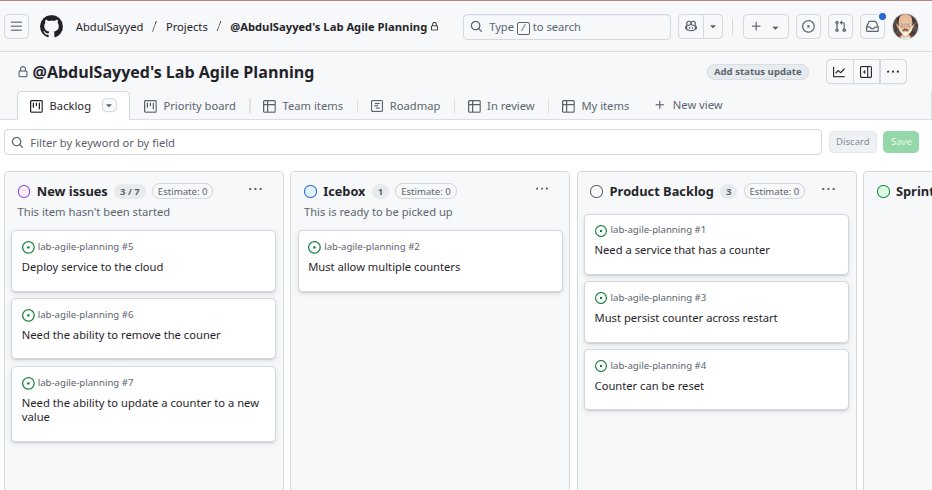
Prioritization Process
For the counter service example, the prioritization might proceed as follows:
- The basic counting functionality would likely be the top priority as it’s fundamental to the service
- Persistence functionality might come next as it enhances reliability
- The ability to reset counters could follow
- Multiple counter support might be deferred to later if a single counter meets immediate needs
When prioritizing, it’s important to consider the minimal viable product (MVP) approach. For example, the initial version might implement just a single counter without persistence, with those features added in subsequent iterations.
Moving Stories to the Product Backlog
As stories are prioritized, they move from initial ideas or “new issues” into the formal product backlog. This transition represents a commitment to eventually implement these features, though the exact timing remains flexible based on ongoing prioritization.
Conclusion
A product backlog is the central organizing tool for Scrum teams, containing all unimplemented user stories ranked by business importance. Creating effective user stories involves specifying who benefits, what functionality is needed, and why it provides value. Proper story formatting ensures everyone understands the purpose and benefit of each feature, while appropriate prioritization ensures the team works on the most valuable items first. By maintaining a well-structured and prioritized backlog, teams can focus on delivering the highest business value in each sprint.
FAQs
- A list of all tasks assigned to developers for the current sprint
- A ranked list of all unimplemented user stories for a product
- A collection of technical documentation for the development team
- A database of bugs and issues reported by users
(2) A product backlog is a ranked list of all unimplemented user stories for a product. It serves as the single source of requirements for the Scrum team, containing all features that have not yet been implemented or added to a sprint.
- Increased velocity and productivity
- Improved stakeholder communication
- Sprint planning difficulties and potential scope creep
- Better estimation accuracy
(3) If a team doesn’t maintain appropriate detail levels (with more detail at the top of the backlog and less detail at the bottom), they will likely experience difficulties during sprint planning. They may not have enough information to implement top-priority items or may waste time over-specifying items that won’t be implemented soon, leading to scope creep and inefficient use of refinement time.
- Estimate story points for each requirement
- Convert the requirements into properly formatted user stories with roles and benefits
- Add the requirements directly to the sprint backlog
- Implement the requirements in order of technical difficulty
(2) When presented with a list of basic requirements, the team should first convert them into properly formatted user stories following the “As a [role], I need [function/feature], so that [benefit/value]” template. This clarifies who benefits from each feature and why it’s valuable, which is essential for proper prioritization and implementation.
- Items at the top should have more detail than those at the bottom
- Items are typically ranked in order of business importance
- All items must be precisely ranked from top to bottom
- The backlog evolves throughout the development process
(3) It is incorrect that all items must be precisely ranked from top to bottom. While items at the top of the backlog should be carefully ranked by priority, items further down can be more loosely prioritized. Only the next one or two sprints’ worth of stories need precise ranking, while the remainder can have approximate ordering.
- They now specify exactly how to implement each feature
- They clarify who benefits from each feature and why it provides value
- They include detailed technical specifications for developers
- They are now frozen and cannot be modified during development
(2) When requirements are converted to proper user stories, they clarify who benefits from each feature (the role) and why it provides value (the benefit). This goes beyond simply stating what needs to be built and focuses on the business value and intended users, which is the primary advantage of using the user story format.
- The role or persona who benefits from the feature
- The functionality or feature needed
- The business value or benefit provided
- The estimated completion date for the story
(4) The estimated completion date is not part of the standard user story template. The correct template is “As a [role], I need [function/feature], so that [benefit/value]” which includes the role, the functionality needed, and the business value - but not timing estimates, which are determined separately during sprint planning.
- The team is highly efficient at backlog refinement
- The product owner has excellent foresight about future needs
- The team may be wasting effort on items that might change before implementation
- The development process is highly predictable with few changes
(3) When items at the bottom of a backlog (low priority, to be implemented much later) have excessive detail, it suggests the team may be wasting effort on premature specification. These items are likely to change before they are implemented, rendering much of the detailed work obsolete. Following progressive elaboration, teams should focus detail efforts on near-term items.
- Which features can be completed most quickly
- Which features are technically easiest to implement
- Which features are fundamental to the Minimum Viable Product (MVP)
- Which features are most interesting for the developers
(3) When prioritizing a product backlog for a new product, the first consideration should be which features are fundamental to the Minimum Viable Product (MVP). This ensures the team focuses on delivering core functionality that provides essential value before adding secondary features, following the principle of delivering the highest business value first.
| Concept | Description |
|---|---|
| A. Product Backlog | 1. A temporary holding area for new items not yet prioritized |
| B. Sprint-Ready | 2. The central repository of all unimplemented user stories ranked by priority |
| C. User Story | 3. A structured format that specifies who needs a feature, what they need, and why |
| D. New Issues | 4. Having sufficient detail to be implemented in an upcoming sprint |
A-2, B-4, C-3, D-1. The Product Backlog is the central repository of all unimplemented user stories ranked by priority. Sprint-Ready means having sufficient detail to be implemented in an upcoming sprint. A User Story is a structured format that specifies who needs a feature, what they need, and why. New Issues is a temporary holding area for new items not yet prioritized.
False. The product backlog is a living document that evolves throughout the development process. As new information becomes available, items may be added, removed, or reprioritized to reflect changing business needs and technical realities. Keeping the backlog static would prevent the team from adapting to new insights and changing requirements.
- To assign implementation responsibility to specific team members
- To track individual productivity metrics
- To clarify stakeholders and inform design decisions and prioritization
- To establish a hierarchical approval process
(3) Specifying different roles in user stories (e.g., end user, administrator, service provider) clarifies which stakeholders benefit from each feature. This information helps inform both design decisions (how the feature should work for that role) and prioritization (which stakeholder needs should be addressed first), making the stories more valuable for planning and implementation.